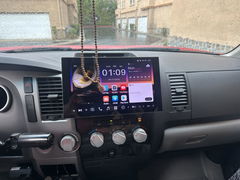
Screen works nicely and connects to my phone via Bluetooth very easily and upon starting my car. The screen and apps are easy to navigate and the CarPlay app for the iPhone is exactly like any current car with a built in radio and CarOlay interface. I use the FM transmitter to play both Apple Music and SiriusXM app through the car speakers. The CarPlay app allows for hands free phone, Siri, and speech to text response to in coming text messages. Phone calls and text readings come through the car speakers. The installation of the screen is easy. Figuring out how to run the backup cam is more complex but there are a lot of videos online to assist hiding the wires. The back up camera has a trigger wire that can be integrated with the reverse lights. By integrating it, the camera automatically comes on when shifting into reverse and the guideline grid appears on the screen to help position the car while backing up. If the trigger wire isn’t integrated with the reverse lights, you’ll need to use the app to activate the backup camera and the guideline grid will not appear on screen. Either way, however, the backup camera is HD, provides a great image, and a wide view. I actually think it’s better than my 2025 factory backup camera on other SUV. The steering wheel attached to control volume and app filter actions appears to work fine but I haven’t fully explored.
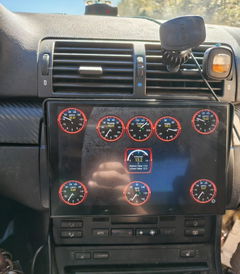
The ATOTO S8 Gen 4 isn't a step down. While there are some areas ATOTO skimped on to keep the price in a sweet spot, it's definitely not a slouch by any means. I've had no issues running around 10 apps in the background—it stays snappy, and you can't even tell background tasks are running, even with my live OBD layout going and custom themes applied to the gauges. Now, with that said, I did run into one major quirk out of the box: trying to connect my BFAX OBD2 scanner. It would connect once, and then refuse to reconnect unless I unpaired and repaired it—and even then, it was a total coin toss. Having dealt with this exact same headache on my old XY Auto unit before, I knew the workaround: Android can be finicky with newer stacks, so dropping back to an older Bluetooth codec version clears it right up. Here is a quick "how-to" fix it: Go into the main Settings app (not the quick drop-down menu). Scroll to the bottom and select ABOUT. Scroll to the bottom again, Build Number and tap it 7 times. It will prompt you for a security passcode. (Note: Mine was 2026107 i.e. 2026 sept 7th. If you do this in 2028 in March on the 10th, your code will be 20280310, though it might be 2028310 depending on whether it requires a leading zero for the month!). -as I had tried (many) codes prior I can't be sure if mine required the 07 or not. Once unlocked, you are in Developer Options (do not touch settings you aren't familiar with!). Scroll down to the Bluetooth options and find AVRCP version, then change it from 1.5 down to 1.3. (Optional bonuses while you're in here: enable "show taps" so you know where you're touching, and turn window animation scales completely OFF). Unpair your trouble device, pair it fresh, and your disconnect loop should be sorted out. Do NOT go touching stuff that you have no idea what it does. If for some reason you need fastboot in the future (which you may when Google locks Android down) OEM unlocking might be a good thing to remember. Though if you needed this guide (you probably shouldn't mess with it?). Hardware & Audio Thoughts: The build quality is a massive step up over my old unit. The UI is clean, intuitive if you're used to Android, and gets plenty bright on stock settings. However, I do NOT like the fact it's missing face controls (no actual volume rocker etc. built into it). While it does have an option to have a "slide out" nav/volume bar you can't make it stay there, it auto hides though I am making a request to add this option, as having to pull DOWN on Android to get volume, and home buttons is a horrible choice in my opinion. It fit snugly inside my BMW E46 dash (which has virtually zero space), so it should fit almost anywhere, but definitely double-check your measurements first. If you do use this, it may be wise to have a dash mount kit as I would have needed one myself if it had not been for my old XY Auto unit (specifically for the BMW E46) as I modified its face plate to fit the ATOTO S8 Gen 4, that way it looked factory! It doesn't feel cheap, the response time is great, and the built-in fan keeps it cool (you can adjust fan behavior in the settings if needed). Factory settings code is 3368 (though it can vary by region/build). Most importantly for car audio guys: the built-in DSP is actually really good. You can fine-tune low-pass and high-pass filtering directly to keep muddy sub-bass out of the door speakers and tweeters, making the highs and mids sound great once dialed in. Not many Android units give you that level of granular control. Considering my box tuning, my low pass via sub is set to 20hz up to 58hz which slams down low. Pre-Out Voltage & Clipping Note: I suspect the head unit may be sending a clipped signal at higher volumes, which is why I'm planning to measure the RCA AC voltage with a multimeter. For audiophiles or anyone running high-output amps, a dirty or low RCA voltage isn't ideal because it forces you to push amp gains higher than they should be. If the pre-outs start clipping early under testing, adding a line driver like the Timpano TPT-EQ7 (to feed a clean 10V signal straight to the amp) will be mandatory. I will update this review with RCA voltage info and where it clips once I've tested it. I mention this due to the sheer fact that android head units are notorious for "under delivering" on RCA voltage. If atoto's claims are true, then i must upgrade my sub (doing that anyways to be honest) Overall, highly recommended if you're looking for a feature-packed head unit and don't mind tweaking a few settings under the hood! Left photo is my old xy auto unit F929b (cheap, fake ram/storage numbers, avoid), right photo is the Atoto S8 Gen 4 attached both to get an "example" of what it looked like prior, and after with the face plate. P.S. android auto works so well i cant stop it from connecting most the time, why did android auto have its "never" option removed lol!?!?
ATOTO S84G209P 9" Double DIN Android Head Unit, Wireless CarPlay & Android Auto, Built-in 4G LTE, Agentic AI, Hi-Fi DSP, Optical S/PDIF, F/R Dash Cam Inputs, GPS Track, LRV, 4GB+64GB
Anonymous
Very good product works great but most
Very good product works great but most importantly the customer service from atoto is amazing
ATOTO AC-4450 Bluetooth OBD2 Scanner, Car Diagnostic Tool & Engine Fault Code Reader, Torque App Compatible, Works with All ATOTO Android Stereos
Anonymous
Very nice stereo
Very nice stereo. Easy installation.
ATOTO X10G225E 12.5" QLED Double Din Car Stereo, AI Android, 8G+128G, 4G LTE, Wireless CarPlay & Android Auto, Dual Bluetooth & WiFi, 7.1.2 Channel Audio, Hi-Volt RCA, 36-Band EQ, HDMI Input