ATOTO Car Stereo, Car Audio, GPS Navigation, Wireless Carplay Adapter

Free Shipping · 7-Day Delivery

18-Month Warranty

ATOTOZONE X10 7inch Android Double Din Car Stereo, 8G+128G, AI Assistant Head Unit, 4G LTE, Wireless Carplay & Android Auto,Dual Bluetooth, 7.1.2 CH Audio,HDMI IN, 36B-EQ, 2-Cam DVR Ready, X10G2A7E

£501.90 GBP £601.90
Coupon

Certified Refurbished – Officially Tested, Like-New Performanc

Due to our overseas warehouse holiday, orders placed between December 20 and December 28 will be shipped starting December 29.

What Does “Certified Refurbished” Mean?

All ATOTO Certified Refurbished car stereos are customer-returned units that have been:

  • ✔ Fully inspected and tested byATOTO technicians
  • ✔ 100% functional — same performance as new
  • ✔ Updated to the latest firmware
  • ✔ Reset to factory settings
  • ✔ Cleaned and repackaged
  • ✔ Comes with all essential accessories


⚠ May contain very minor cosmetic signs (not affecting performance)
💡 Some units are actually brand-new, returned unopened to our overseas warehouse.

Official ATOTO Warranty

  • 6-Month Warranty Included
  • Free Lifetime Firmware Updates
  • 30-Day Return or Exchange.

For more details, please visit our [Warranty Policy].


Goes well with

Buy accessories with a car stereo and enjoy 3% cashback on accessories.

Features

  • ATOTOZONE X10 7inch Android Double Din Car Stereo, 8G+128G, AI Assistant Head Unit, 4G LTE, Wireless Carplay & Android Auto,Dual Bluetooth, 7.1.2 CH Audio,HDMI IN, 36B-EQ, 2-Cam DVR Ready, X10G2A7E

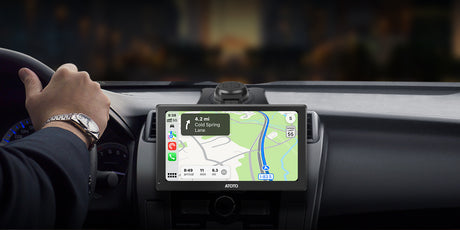
  • Powerful Performance: QCM SD665 SoC with 8GB+128GB offers snappy response. Enjoy effortless app launches, multi-tasking, wireless CarPlay/Android Auto/MirrorLink, and future-proof firmware updates on a refined, custom AICE 13 UI

  • 7" QLED Display: QLED panel at 550 nits and strong light suppression coating. Crisp 1280×720 resolution elevates navigation, video, and app experiences

  • Dual-Camera Recording: Connect two 1080P cams to record front and rear or interior footage simultaneously. Parking monitoring, emergency video lock, GPS-linked playback, and approaching OmniGuard Pro tech add more confidence to driving

  • Evolved Audio Suite: DSP with 36-band EQ, time alignment, 3-way crossover & HD 24-bit DAC. Optical out & 10 assignable channels drive tweeters, subs & more—delivering custom 7.1.2 sound without extra gear. Your car becomes a concert hall

  • Cellular Network & Dual-Band Wi-Fi: Stream music, get map updates, and install apps with reliable cellular network or Wi-Fi. Built-in hotspot supports passengers’ devices. G00gle Play and Findapps give you endless infotainment options

Specifications

Specification Value

Host Technology Platform Name

X10-4G SoundPlus Edition
Host Technology Platform Code X10
Version Configuration in English 4G SoundPlus Edition
Operating System Type Android
Operating system version 13
External SD storage support NO
External USB storage support Max 2TB
Main control chip model Snapdragon 665 (QCM6125)
Installation Size Classification Double-Din
Storage 128GB
Memory 8GB
Built-in communication module YES
WIFI hotspot connection YES, 2.4 & 5.0 Ghz
Screen material QLED
Default Bluetooth Bluetooth 5.0, supports HFP, HSP, A2DP, AVRCP, PBAP
Secondary Bluetooth Bluetooth2 supports Bluetooth Tethering and BLE Connection
Screen Size 7.0
Wired CarPlay NO
Wireless CarPlay YES
Wired Android Auto NO
Wireless Android Auto YES

Reviews (16)

Customer Reviews

Based on 16 reviews
0%
(0)
100%
(16)
0%
(0)
0%
(0)
0%
(0)
R
R. Blakemore
Good-value very versatile head unit for a car with Double DIN Slot

Four years ago I purchased the 'ATOTO S8 Standard 7 inch Double-DIN Car Stereo' to put into my Ford Focus Mk1. It was good - but I wanted to try an upgrade.I imagined that the installation would be a simple like-for-like replacement (just removing the old Atoto S8 and installing this one). It was a seamless installation so didn't disappoint. Installation was as simple as taking out the old unit, and plugging in the new cabling to the old setup. [Since my Ford car did not come with a factory Double DIN slot, four years ago I put in a replacement car dash fascia and this new X10 fits into that old Double-DIN car dash fascia without issue, just like the old S8 did.]One of my main reasons for wanting to upgrade was that the previous S8 unit required firmware updates to be carried out offline via SD Card, which was quite a faff. This X10 Atoto unit now offers auto-updates over the air. Atoto are regularly pushing updates and fixes (which is great), so I wanted a seamless way of receiving these.It runs regular Android as the base OS (so you can install whatever you like via Google Play), and I also use Android Auto.I'm enjoying using the device, but have hit a few snags. Those I'm talking with support to help them address/fix the issue - they are responsive and helpful.1) The biggest gripe I have - which and making me drop a star (hopefully this will get resolved via the ongoing Atoto customer support, and if it does I'll up to 5*) is that the Bluetooth audio is dropping out NAVIGATION audio (and only navigation audio!) at random times:  It happens in both Waze and Maps. Navigation audio just stops, when all other sounds are ok.  All other applications seem fine.  For instance - I use BBC sounds regularly, and that never goes wrong. BBC sounds will keep playing, or the radio/whatever, but the navigation audio silently stops coming through - when it has just been working. It makes no sense to me. I can relatively easily get the navigation audio back, but I need to reboot the Atoto unit to do it.2) On my old Atoto, it used to change into night mode instantly in both Waze and Google Maps whenever I put on the headlights - but this X10 device is not doing that any more, despite an identical connection. I can change settings in my *phone* on Waze that make the Atoto automatically go into night mode at night [so night mode is auto-triggered by time of day, which is a good enough workaround]. But I can't yet find any method to put Google Maps automatically into night mode at all. I need to change it manually (within Android Auto settings on my phone) each night if I want to change it. So I'm currently sticking to using only using Waze, which is ok for me as it is better software.I'm hopeful that the future firmware updates will fix the above issues. Atoto are very good with customer service. And they've already said they'll pass on other suggestions from me to their support team.For instance - I've found the settings to increase the font size in Settings - [i - which is a sub-menu] - Accessibility - Display size and text - Font size (Make text bigger or smaller). That's a useful thing to change - and I suggested they lift this out into a top menu shortcut, which they're looking into for example.Given that firmware updates are much much easier on this X10 unit (as they're over-the-air), if they do fix the display and audio bugs, it will be very easy to install the firmware updates and get those latest fixes.Overall I'm pleased with the product as I see it as an improvement on what I had in before. I'll come back and update the review if I can get those snags fixed with support.

R
R. Blakemore
Good-value very versatile head unit for a car with Double DIN Slot

Four years ago I purchased the 'ATOTO S8 Standard 7 inch Double-DIN Car Stereo' to put into my Ford Focus Mk1. It was good - but I wanted to try an upgrade.I imagined that the installation would be a simple like-for-like replacement (just removing the old Atoto S8 and installing this one). It was a seamless installation so didn't disappoint. Installation was as simple as taking out the old unit, and plugging in the new cabling to the old setup. [Since my Ford car did not come with a factory Double DIN slot, four years ago I put in a replacement car dash fascia and this new X10 fits into that old Double-DIN car dash fascia without issue, just like the old S8 did.]One of my main reasons for wanting to upgrade was that the previous S8 unit required firmware updates to be carried out offline via SD Card, which was quite a faff. This X10 Atoto unit now offers auto-updates over the air. Atoto are regularly pushing updates and fixes (which is great), so I wanted a seamless way of receiving these.It runs regular Android as the base OS (so you can install whatever you like via Google Play), and I also use Android Auto.I'm enjoying using the device, but have hit a few snags. Those I'm talking with support to help them address/fix the issue - they are responsive and helpful.1) The biggest gripe I have - which and making me drop a star (hopefully this will get resolved via the ongoing Atoto customer support, and if it does I'll up to 5*) is that the Bluetooth audio is dropping out NAVIGATION audio (and only navigation audio!) at random times:  It happens in both Waze and Maps. Navigation audio just stops, when all other sounds are ok.  All other applications seem fine.  For instance - I use BBC sounds regularly, and that never goes wrong. BBC sounds will keep playing, or the radio/whatever, but the navigation audio silently stops coming through - when it has just been working. It makes no sense to me. I can relatively easily get the navigation audio back, but I need to reboot the Atoto unit to do it.2) On my old Atoto, it used to change into night mode instantly in both Waze and Google Maps whenever I put on the headlights - but this X10 device is not doing that any more, despite an identical connection. I can change settings in my *phone* on Waze that make the Atoto automatically go into night mode at night [so night mode is auto-triggered by time of day, which is a good enough workaround]. But I can't yet find any method to put Google Maps automatically into night mode at all. I need to change it manually (within Android Auto settings on my phone) each night if I want to change it. So I'm currently sticking to using only using Waze, which is ok for me as it is better software.I'm hopeful that the future firmware updates will fix the above issues. Atoto are very good with customer service. And they've already said they'll pass on other suggestions from me to their support team.For instance - I've found the settings to increase the font size in Settings - [i - which is a sub-menu] - Accessibility - Display size and text - Font size (Make text bigger or smaller). That's a useful thing to change - and I suggested they lift this out into a top menu shortcut, which they're looking into for example.Given that firmware updates are much much easier on this X10 unit (as they're over-the-air), if they do fix the display and audio bugs, it will be very easy to install the firmware updates and get those latest fixes.Overall I'm pleased with the product as I see it as an improvement on what I had in before. I'll come back and update the review if I can get those snags fixed with support.

R
R. Blakemore
Good-value very versatile head unit for a car with Double DIN Slot

Four years ago I purchased the 'ATOTO S8 Standard 7 inch Double-DIN Car Stereo' to put into my Ford Focus Mk1. It was good - but I wanted to try an upgrade.I imagined that the installation would be a simple like-for-like replacement (just removing the old Atoto S8 and installing this one). It was a seamless installation so didn't disappoint. Installation was as simple as taking out the old unit, and plugging in the new cabling to the old setup. [Since my Ford car did not come with a factory Double DIN slot, four years ago I put in a replacement car dash fascia and this new X10 fits into that old Double-DIN car dash fascia without issue, just like the old S8 did.]One of my main reasons for wanting to upgrade was that the previous S8 unit required firmware updates to be carried out offline via SD Card, which was quite a faff. This X10 Atoto unit now offers auto-updates over the air. Atoto are regularly pushing updates and fixes (which is great), so I wanted a seamless way of receiving these.It runs regular Android as the base OS (so you can install whatever you like via Google Play), and I also use Android Auto.I'm enjoying using the device, but have hit a few snags. Those I'm talking with support to help them address/fix the issue - they are responsive and helpful.1) The biggest gripe I have - which and making me drop a star (hopefully this will get resolved via the ongoing Atoto customer support, and if it does I'll up to 5*) is that the Bluetooth audio is dropping out NAVIGATION audio (and only navigation audio!) at random times:  It happens in both Waze and Maps. Navigation audio just stops, when all other sounds are ok.  All other applications seem fine.  For instance - I use BBC sounds regularly, and that never goes wrong. BBC sounds will keep playing, or the radio/whatever, but the navigation audio silently stops coming through - when it has just been working. It makes no sense to me. I can relatively easily get the navigation audio back, but I need to reboot the Atoto unit to do it.2) On my old Atoto, it used to change into night mode instantly in both Waze and Google Maps whenever I put on the headlights - but this X10 device is not doing that any more, despite an identical connection. I can change settings in my *phone* on Waze that make the Atoto automatically go into night mode at night [so night mode is auto-triggered by time of day, which is a good enough workaround]. But I can't yet find any method to put Google Maps automatically into night mode at all. I need to change it manually (within Android Auto settings on my phone) each night if I want to change it. So I'm currently sticking to using only using Waze, which is ok for me as it is better software.I'm hopeful that the future firmware updates will fix the above issues. Atoto are very good with customer service. And they've already said they'll pass on other suggestions from me to their support team.For instance - I've found the settings to increase the font size in Settings - [i - which is a sub-menu] - Accessibility - Display size and text - Font size (Make text bigger or smaller). That's a useful thing to change - and I suggested they lift this out into a top menu shortcut, which they're looking into for example.Given that firmware updates are much much easier on this X10 unit (as they're over-the-air), if they do fix the display and audio bugs, it will be very easy to install the firmware updates and get those latest fixes.Overall I'm pleased with the product as I see it as an improvement on what I had in before. I'll come back and update the review if I can get those snags fixed with support.

R
R. Blakemore
Good-value very versatile head unit for a car with Double DIN Slot

Four years ago I purchased the 'ATOTO S8 Standard 7 inch Double-DIN Car Stereo' to put into my Ford Focus Mk1. It was good - but I wanted to try an upgrade.I imagined that the installation would be a simple like-for-like replacement (just removing the old Atoto S8 and installing this one). It was a seamless installation so didn't disappoint. Installation was as simple as taking out the old unit, and plugging in the new cabling to the old setup. [Since my Ford car did not come with a factory Double DIN slot, four years ago I put in a replacement car dash fascia and this new X10 fits into that old Double-DIN car dash fascia without issue, just like the old S8 did.]One of my main reasons for wanting to upgrade was that the previous S8 unit required firmware updates to be carried out offline via SD Card, which was quite a faff. This X10 Atoto unit now offers auto-updates over the air. Atoto are regularly pushing updates and fixes (which is great), so I wanted a seamless way of receiving these.It runs regular Android as the base OS (so you can install whatever you like via Google Play), and I also use Android Auto.I'm enjoying using the device, but have hit a few snags. Those I'm talking with support to help them address/fix the issue - they are responsive and helpful.1) The biggest gripe I have - which and making me drop a star (hopefully this will get resolved via the ongoing Atoto customer support, and if it does I'll up to 5*) is that the Bluetooth audio is dropping out NAVIGATION audio (and only navigation audio!) at random times:  It happens in both Waze and Maps. Navigation audio just stops, when all other sounds are ok.  All other applications seem fine.  For instance - I use BBC sounds regularly, and that never goes wrong. BBC sounds will keep playing, or the radio/whatever, but the navigation audio silently stops coming through - when it has just been working. It makes no sense to me. I can relatively easily get the navigation audio back, but I need to reboot the Atoto unit to do it.2) On my old Atoto, it used to change into night mode instantly in both Waze and Google Maps whenever I put on the headlights - but this X10 device is not doing that any more, despite an identical connection. I can change settings in my *phone* on Waze that make the Atoto automatically go into night mode at night [so night mode is auto-triggered by time of day, which is a good enough workaround]. But I can't yet find any method to put Google Maps automatically into night mode at all. I need to change it manually (within Android Auto settings on my phone) each night if I want to change it. So I'm currently sticking to using only using Waze, which is ok for me as it is better software.I'm hopeful that the future firmware updates will fix the above issues. Atoto are very good with customer service. And they've already said they'll pass on other suggestions from me to their support team.For instance - I've found the settings to increase the font size in Settings - [i - which is a sub-menu] - Accessibility - Display size and text - Font size (Make text bigger or smaller). That's a useful thing to change - and I suggested they lift this out into a top menu shortcut, which they're looking into for example.Given that firmware updates are much much easier on this X10 unit (as they're over-the-air), if they do fix the display and audio bugs, it will be very easy to install the firmware updates and get those latest fixes.Overall I'm pleased with the product as I see it as an improvement on what I had in before. I'll come back and update the review if I can get those snags fixed with support.

R
R. Blakemore
Good-value very versatile head unit for a car with Double DIN Slot

Four years ago I purchased the 'ATOTO S8 Standard 7 inch Double-DIN Car Stereo' to put into my Ford Focus Mk1. It was good - but I wanted to try an upgrade.I imagined that the installation would be a simple like-for-like replacement (just removing the old Atoto S8 and installing this one). It was a seamless installation so didn't disappoint. Installation was as simple as taking out the old unit, and plugging in the new cabling to the old setup. [Since my Ford car did not come with a factory Double DIN slot, four years ago I put in a replacement car dash fascia and this new X10 fits into that old Double-DIN car dash fascia without issue, just like the old S8 did.]One of my main reasons for wanting to upgrade was that the previous S8 unit required firmware updates to be carried out offline via SD Card, which was quite a faff. This X10 Atoto unit now offers auto-updates over the air. Atoto are regularly pushing updates and fixes (which is great), so I wanted a seamless way of receiving these.It runs regular Android as the base OS (so you can install whatever you like via Google Play), and I also use Android Auto.I'm enjoying using the device, but have hit a few snags. Those I'm talking with support to help them address/fix the issue - they are responsive and helpful.1) The biggest gripe I have - which and making me drop a star (hopefully this will get resolved via the ongoing Atoto customer support, and if it does I'll up to 5*) is that the Bluetooth audio is dropping out NAVIGATION audio (and only navigation audio!) at random times:  It happens in both Waze and Maps. Navigation audio just stops, when all other sounds are ok.  All other applications seem fine.  For instance - I use BBC sounds regularly, and that never goes wrong. BBC sounds will keep playing, or the radio/whatever, but the navigation audio silently stops coming through - when it has just been working. It makes no sense to me. I can relatively easily get the navigation audio back, but I need to reboot the Atoto unit to do it.2) On my old Atoto, it used to change into night mode instantly in both Waze and Google Maps whenever I put on the headlights - but this X10 device is not doing that any more, despite an identical connection. I can change settings in my *phone* on Waze that make the Atoto automatically go into night mode at night [so night mode is auto-triggered by time of day, which is a good enough workaround]. But I can't yet find any method to put Google Maps automatically into night mode at all. I need to change it manually (within Android Auto settings on my phone) each night if I want to change it. So I'm currently sticking to using only using Waze, which is ok for me as it is better software.I'm hopeful that the future firmware updates will fix the above issues. Atoto are very good with customer service. And they've already said they'll pass on other suggestions from me to their support team.For instance - I've found the settings to increase the font size in Settings - [i - which is a sub-menu] - Accessibility - Display size and text - Font size (Make text bigger or smaller). That's a useful thing to change - and I suggested they lift this out into a top menu shortcut, which they're looking into for example.Given that firmware updates are much much easier on this X10 unit (as they're over-the-air), if they do fix the display and audio bugs, it will be very easy to install the firmware updates and get those latest fixes.Overall I'm pleased with the product as I see it as an improvement on what I had in before. I'll come back and update the review if I can get those snags fixed with support.

Payment & Security

Payment methods

  • American Express
  • Apple Pay
  • Bancontact
  • Google Pay
  • iDEAL Wero
  • Mastercard
  • PayPal
  • Shop Pay
  • Union Pay
  • Visa
  • Klarna
  • Afterpay

Your payment information is processed securely. We do not store credit card details nor have access to your credit card information.

4-1

Powerful Built-in Amplifier with 36-Band Equalizer and 8 EQ Presets to custom EQ Effect.

4-2

6 Audio Settings: crossover, reverb, delay, audio output, Stereo, bass boost

4-3

SUBR & SUBL Subwoofer Outputs: enhanced bass

FR/ FL Midrange Outputs: clear midrange

FR/ FL Tweeter Outputs: clear high-frequency sound

4-4

Experience crystal clear, high-fidelity sound with Optical Fiber and Coaxial RCA Outputs.

6-1

Highly Customizable: Customizable home screen styles, multi-page sliding home screen, and diverse widgets for a truly personalized experience.

6-2

Real-time Weather: X10's real-time weather keeps you updated with the latest local weather information.

6-3

Split Screen: View and use two apps on the screen simultaneously.

6-4

2s Fast Boot: lf your X10 doesn't start up within two seconds, please reach out to us for help.

Drive the Difference: ATOTO Car Stereos Features Unveiled

1

X10G2A7E

2

A5LG2A7T

3

A5LG2B7T

4

A5LG209T

5

A5LG211T

Processor / Memory & Storage
SD665(QCM6125),8-Core, 8G+128G QuaCore ARM Processor; 2G+32G QuaCore ARM Processor; 2G+32G QuaCore ARM Processor; 2G+32G QuaCore ARM Processor; 2G+32G
Display Screen
QLED 1280*720 ,Button IPS 1280*720, Button IPS 1280*720, Touchscreen IPS 1280*720 ,Touchscreen IPS 1280*720,Touchscreen
Bluetooth Phone connection
Dual phone connection Single Single Single Single
Bluetooth Chips
Dual Bluetooth Single Bluetooth Single Bluetooth Single Bluetooth Single Bluetooth
Carplay/Android Auto
wireless wireless / wired wireless / wired wireless / wired wireless / wired
Phone Mirroring
x √(wired/ wireless) √(wired/ wireless) √(wired/ wireless) √(wired/ wireless)
Network Connection
4G, Bluetooth, WI-FI Wi-Fi, Bluetooth Wi-Fi, Bluetooth Wi-Fi, Bluetooth Wi-Fi, Bluetooth
Built-in Pre-amplifier
Max 4*49W, RMS 4*29W Max 4*45W, RMS 4*24W Max 4*45W, RMS 4*24W Max 4*45W, RMS 4*24W Max 4*45W, RMS 4*24W
DSP& EQ
✓DSP,36 B- EQ, Time correction ✓DSP,24 B- EQ, Time correction ✓DSP,24 B- EQ, Time correction ✓DSP,24 B- EQ, Time correction ✓DSP,24 B- EQ, Time correction
Audio
4ch Full,2 Sub,2 Mid,Opt/RCA 4.1 Channel 4.1 Channel 4.1 Channel 4.1 Channel
AI Assistant- Drivechat
Install&Update Netflix Via App